

Password Protect a Page or a Post on your WordPress Site
 WordPress has a built-in password-protect feature on every post and page. In the Publish options (upper right), select Visibility > Edit > Password protected, and voila, it’s done!
Some useful plugins that support password protection include:
Custom Password Protected Text plugin gives the ability to add text to a password-protected page, providing for example instructions or an explanation of the protection. (Used on the NedPickleball member page.)
The Protected Posts Logout Button plugin places a logout button on a password-protected page, which is useful for those on a public computer (and also for testing purposes). (Used on the NedPickleball member page.)
Smart Passworded Pages automatically adds the same password to all child pages of a given parent page. The parent page is identifed when a shortcode is placed on the page, giving the opportunity to login to all the child pages using a single password. The child pages automatically assume the password of the adult. The system is used on clent pages on this site: https://www.highpeaksmedia.com/websites/analytics/
The BAW Multipass for Protected Pages plugin inserts a field into the same Publish options area that allows multiple passwords for a given page.
If this doesn’t work, or if you have work-a-rounds or options, please share!
The Password Protect option:
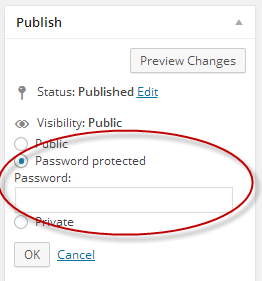
Image Credit: from Pixabay, Public Domain


Leave a Reply
Want to join the discussion?Feel free to contribute!